Built for banquet halls & venue operators
Run your marquee business from quote to celebration
Quotations, bookings, client reviews, kitchen ops, accounts, inventory, payroll, and reports — everything your venue team needs in one platform.
Saturday, 27 June 2026
Events Today
12
Lunch / Dinner
7
Dinner: 5
New Quotations
8
Food Tastings
3
Today's Events
The problem
Running a marquee business shouldn't mean juggling spreadsheets
Most venues start with Excel and group chats. As you grow, the chaos grows with them.
Sound familiar?
- Quotes and bookings scattered across spreadsheets, email, and WhatsApp
- Kitchen and decor teams find out about events too late
- Outstanding payments tracked manually — no single view of what's owed
- Guest feedback never captured — and Google reviews left to chance
- Staff leave and payroll managed in yet another system
- Invoices and quotations that don't reflect your brand
One workspace for your entire event business
- Quote to booking in a single, seamless flow
- Calendar everyone on your team can trust
- Post-event reviews that feed Google ratings
- Full accounts, inventory, and payroll together
- Your logo and details on every document
All-in-one platform
Everything your venue needs
From the first quotation to the final payment — purpose-built for marquee and banquet operators, not generic CRM software.
Events
Quotations & Sales
Create polished proposals with per-head pricing, menus, charge items, and taxes.
- Convert quote to booking in one click
- Status workflow: draft → sent → converted
- Export branded PDF quotations
Bookings & Calendar
Manage confirmed events with lunch/dinner sessions, multi-site venues, and payment tracking.
- Decor coordination
- Per-booking profit tracking
- Cancellation audit trail
Food Tasting
Schedule tasting sessions linked to quotations or bookings. Keep sales and kitchen aligned.
Operations Calendar
FullCalendar views for kitchen and decor. Print daily event sheets and per-event menu PDFs.
Client Reviews
Capture post-event feedback with custom questionnaires — staff entry or guest QR self-submit.
- Star ratings and custom questions
- Guest review link via QR code
- Google Review QR for 4.5+ ratings
Finance
Accounts & Cash Book
Full money-in/money-out ledger with cash book, fund transfers, and bank account management.
- Cash position at a glance
- Payment vouchers with approval
- General income & expenses
Payments & Reconciliation
Track advances, outstanding balances, and reconcile bills per booking — sorted by largest gap.
Vendors & Event Expenses
Track vendor payables, event expenses, and supplier outstanding — all linked to bookings.
Operations
Inventory & Stock
Products, purchases, stock balances, low-stock alerts, and Excel import for bulk onboarding.
Event Stock Sheets
Per-booking consumption sheets and stock demands linked to events — know exactly what each event costs.
People
Staff & Leave
Maintain your roster, approve leave, and sync biometric attendance from devices like ZKTeco.
- Leave balances & accrual
- Work timings & shifts
- First-in / last-out reports
Payroll & Deductions
Monthly payroll runs, payslips, allowances, bonuses, loans, advances, and deductions.
Insights
Reports & Analytics
Financial, payables, events, and stock reports with trend charts, filters, and KPI dashboards.
- Net profit trends
- Outstanding by event
- Stock valuation & consumption
Setup
Menus & Pricing
Menu templates, charge items, sub-charges, taxes, and event sites for multi-hall venues.
Business Settings & Branding
Upload your logo, set terms, timings, Google Review URL, and custom client review questions.
Platform
Roles & Security
Custom roles with granular permissions, active session management, and multi-tenant SaaS architecture.
See it in action
Built for how marquee businesses actually work
Explore the modules your team uses every day — from the first quote to event day operations.
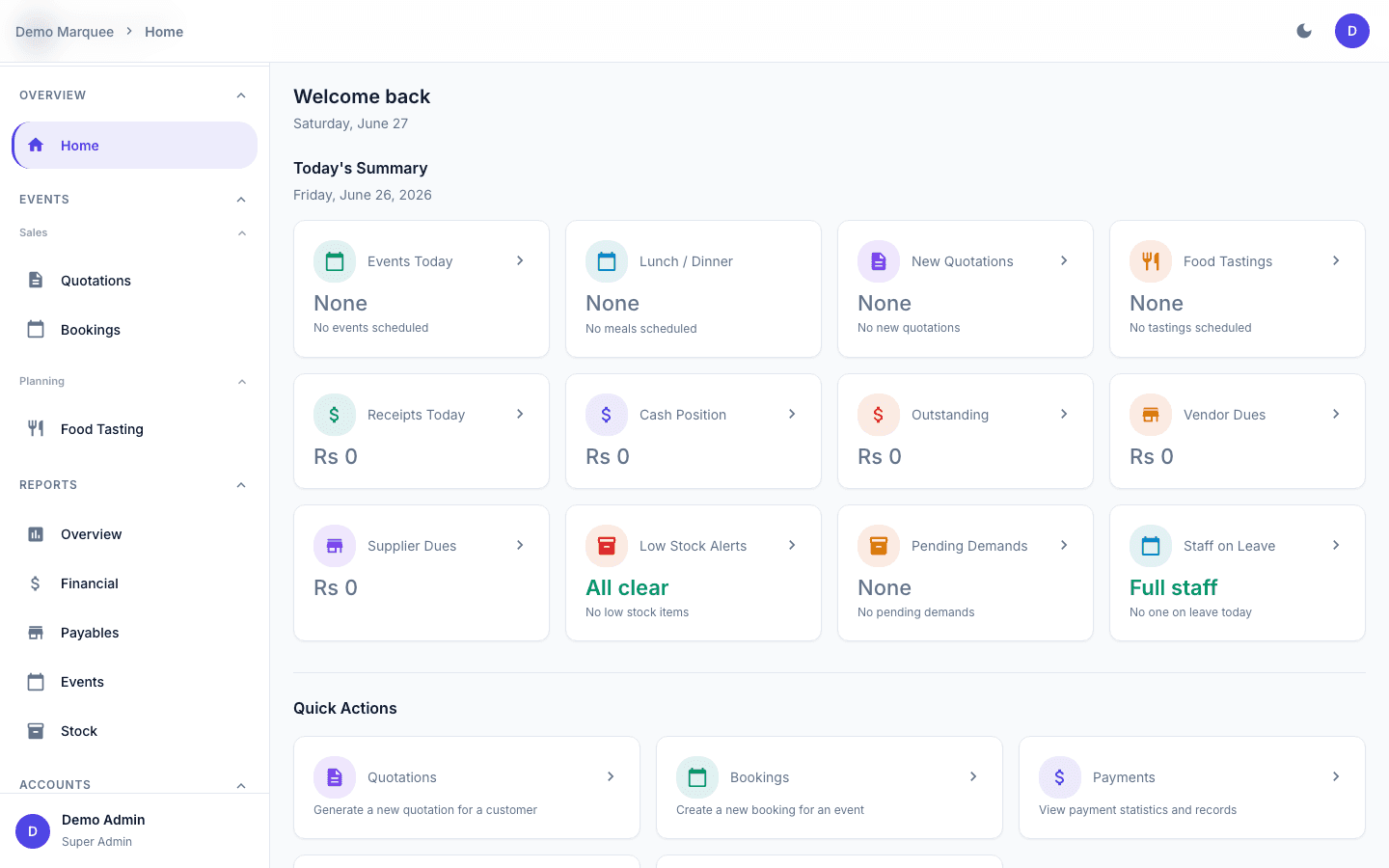
Live ops dashboard
Your business at a glance, every morning
The same Today's Summary your team sees on login — events, cash, receivables, payables, and stock alerts in one view.
Today's Summary
Events Today
12
Lunch / Dinner
7
Dinner: 5
New Quotations
8
Food Tastings
3
Cash Position
PKR 4.2M
Outstanding
PKR 2.4M
Vendor Dues
PKR 890K
Low Stock
5
Mon
Tue
Wed
Thu
Fri
Sat
Sun
Top Outstanding
Quotation Pipeline
Workflow
How it works
A workflow that mirrors how marquee businesses actually operate — from first inquiry to post-event feedback.
Create Quotation
Capture customer details, event dates, guest count, menus, and pricing.
- Per-head pricing & taxes
- Branded PDF export
- Contact log & follow-ups
Schedule Tasting
Book a food tasting session so clients can approve the menu before committing.
- Linked to quote or booking
- Calendar view for kitchen
- Sales-kitchen alignment
Confirm Booking
Convert the quote to a confirmed event with payment tracking from day one.
- One-click conversion
- Stock demands & event sheets
- Decor & vendor expenses
Run Event & Collect Feedback
Reconcile payments on event day, then capture client reviews and drive Google ratings.
- Kitchen PDFs & cash book
- Staff or guest QR review
- Google Review QR for 4.5+
Team access
Built for every role on your team
Each team member sees exactly what they need — nothing more, nothing less. Custom roles with granular permissions keep operations secure.
Owners & Managers
Full visibility across operations — bookings, payments, staff, reports, and business settings in one dashboard.
Sales
Create quotations, schedule tastings, follow up on your pipeline, and capture post-event client reviews.
Kitchen
View the event calendar, print daily PDFs and menus, and focus on what matters — the food.
Decor
Access event details, track decor payments, upload reference images, and update decor specifications.
Front Desk
Clean viewer calendar with upcoming events — and entry points to record client feedback after celebrations.
Accounts
Manage cash book, payment vouchers, vendor payables, reconciliation, and financial reports.
Branded documents
Your brand, your documents
Configure once in Business Settings — every PDF quotation, invoice, menu sheet, and daily event printout reflects your identity.
- Upload your logo and business details
- Configure address, phone, email, and website
- Set default lunch and dinner timings
- Add your terms and conditions
- Set your Google Review URL for post-event prompts
- Every quotation and invoice carries your branding

Your Venue Name
123 Main Road, City
QUOTATION
#QT-2026-0142
Customer
Ahmed & Family
Event Date
28 June 2026 — Dinner
| Item | Amount |
|---|---|
| Premium Menu (450 pax) | PKR 1,350,000 |
| Hall & Decor | PKR 250,000 |
| Tax (16%) | PKR 256,000 |
Generated by Marquee Desk — your branding, your documents
Today's Summary
Saturday, 27 June 2026
Events Today
12
Lunch / Dinner
7
Dinner: 5
New Quotations
8
Food Tastings
3
Mobile ready
Your venue in your pocket
Owners and managers stay connected on event day — check the dashboard, review bookings, and track payments from anywhere.
Mobile-first design
Bottom navigation for Home, Bookings, Quotes, and Payments on the go.
Install as an app
Add to your home screen for a native app experience — no app store needed.
Works anywhere
Check today's events, record payments, and review quotes from your phone.
Plans
Basic and Premium
Start with essentials for quotes and bookings, or unlock the full operations suite. Pricing is tailored to your venue — contact us for a quote.
No self-serve signup yet. We provision your venue and assign Basic or Premium based on what your team needs.
FAQ
Common questions
Everything you need to know before booking a demo.
We offer two plans — Basic (quotations, bookings, payments, client reviews, and venue setup) and Premium (adds accounts, inventory, payroll, and reports). Pricing depends on your venue size and team. Contact us for a personalized demo and quote — there's no self-serve signup yet.
Request a demo
See how Marquee Desk can streamline your venue operations. Fill out the form and our team will reach out to schedule a personalized walkthrough.
- Personalized demo tailored to your venue
- Guidance on setup and onboarding
- Answers to your team's specific questions
- See accounts, inventory, and reports live